What Should Businesses Check When Planning Office Workstations
Posted by Jay Bhedaj
Filed in Business 38 views
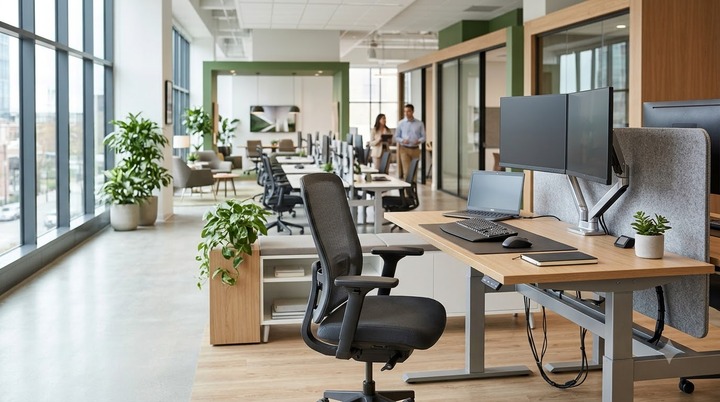
Office workstation planning shapes how efficiently a business actually runs day to day. Get the layout wrong, and teams lose time navigating cramped aisles or waiting for a shared desk. Get the ergonomics wrong, and comfort complaints start showing up within weeks.
Good planning helps in more than desk placement. Employee requirements, layout, ergonomics, storage, technology, flexibility, and budget all pull in different directions, and the businesses that get this right treat workstation planning as a decision process rather than a furniture order. The sections below walk through what actually deserves a close look before committing to a workstation setup.
Understand How Employees Will Use the Workspace
Not all positions need the same style of workstation. Some employees spend most of their day focused on individual work, while others move between meetings, calls, and collaborative tasks. To avoid ending up with unused desks or overcrowded meeting areas, map these working patterns before choosing furniture.
Collaborative or shared work requires a different arrangement than private or focused work. A sales team on constant calls has different needs than a creative team huddled around shared screens. Planning should begin with matching the arrangement of the workstation to the actual workflow, not a generic office template.
Plan the Office Layout and Available Space
Floor area sets hard limits on what's possible, but circulation space matters just as much as square footage. Workstations packed too tightly slow people down and make an office feel smaller than it is, even when the total area is generous.
Spacing between desks, clear paths to meeting areas, and room for people to move without squeezing past colleagues all belong in the layout conversation early, not as an afterthought once furniture arrives. Future expansion deserves a place in this planning too. A layout that works today but leaves no room for headcount growth six months out creates a reconfiguration headache that's avoidable with a bit of foresight.
Consider Ergonomics and Employee Comfort
Desk height, working posture, and monitor positioning affect comfort in ways that compound over a full workday. A desk that's slightly too high or too low doesn't cause problems in an hour it causes problems after a month of repeated strain.
Seating compatibility matters as much as the desk itself. A workstation designed around one type of chair can feel wrong the moment a different chair gets swapped in. The desk should also provide enough surface area for the monitor, keyboard, documents, and equipment employees actually use. None of this requires chasing the latest ergonomic trend. It requires matching the setup to how people genuinely work at their desks.
Check Technology and Cable Management
Today’s workstations have more hardware than desks did a decade ago: numerous monitors, docking stations, and a nest of cables that can convert a neat desk into a disaster quickly. Computers, monitors, power outlets, and data connections all have to be planned for ahead of time or it’s a mad dash to retrofit power strips and cable trays after the furniture is in place.
Cable management isn’t just about looks. Loose cables on the ground are a tripping danger and tangled cords make it difficult to troubleshoot when equipment fails. “The workstation has to support the technology that employees are using, not the technology from three product cycles ago.
Evaluate Storage and Workspace Organization
Storage needs vary widely by role. Some employees need drawer space for personal items and daily paperwork; others need shared storage for equipment, files, or supplies the whole team accesses. Planning storage without this distinction usually leads to either wasted drawer space or a shortage that pushes clutter onto desk surfaces.
Keeping work surfaces organized isn't just a tidiness question; it affects how efficiently people find what they need during the workday. Built-in storage solved thoughtfully at the planning stage saves the awkward retrofit of adding filing cabinets and shelving units after the fact.
Choose a Workstation Configuration That Fits
Individual desks work well for roles needing privacy and focus. Bench-style workstations suit teams that value proximity and quick communication over separation. Modular configurations offer flexibility for offices expecting to reshuffle teams or grow headcount, while collaborative or shared arrangements fit workflows built around group projects and rotating desk use.
There's no single right answer here. The right configuration depends on how a specific team actually works and how much floor space is genuinely available not on whichever layout looks best in a showroom.
Plan for Future Flexibility
Teams grow, shrink, and reorganize more often than office layouts account for. A workstation plan locked into today's headcount can turn into a costly reconfiguration project the moment the business adds a new team or shifts to a different work pattern.
Building in some flexibility from the start, modular components and adjustable configurations and room for a few extra workstations save both money and disruption down the line. Office reconfiguration during a busy quarter is disruptive no matter how it's handled, so planning ahead reduces how often that disruption needs to happen at all.
Consider Quality, Durability and Budget
The lowest purchase price rarely reflects the true cost of a workstation over its working life. Materials and construction quality determine how well a desk holds up under daily use, and cheaper components often mean more maintenance calls and earlier replacement.
Installation costs, accessories, and expected usage intensity all factor into a realistic budget picture. A well-built desk, something in the range of what businesses look for when they consider options like a Herman Miller office desk costs more upfront but typically needs less ongoing maintenance and lasts through more years of daily use. Weighing lifecycle cost against sticker price gives a clearer sense of what a workstation actually costs a business over time.
Conclusion
Successful workstation planning works best as a balancing act, not a single decision. Employee needs, available space, ergonomics, technology, storage, flexibility, and budget all pull against each other. Top ergonomic consultancies, such as Workrite, observe that businesses planning carefully weigh all of them together rather than optimizing for one factor alone. Taking the time to walk through these considerations upfront leads to a workspace that holds up as the business changes, not just one that looks good on day one.